


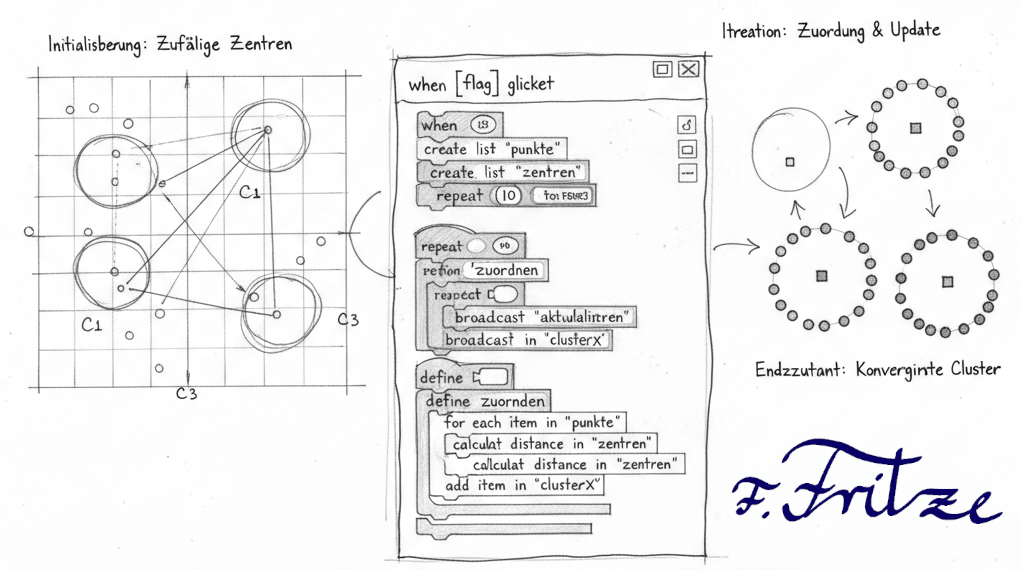
K-Means Clustering is a popular algorithm in the field of unsupervised learning, which is used to divide data into groups or clusters. This approach makes it possible to identify patterns in data without requiring prior labels. For an introduction to the topic and a fun board game to illustrate the concepts of unsupervised learning, you can find information on this page. There you will find materials that help you better understand the basics of K-Means Clustering and apply them in practice.
Step 1: Create prerequisites
In the first step of the development of the K-Means clustering program in Scratch, we create the basic prerequisites for the process. First, we choose the number of cluster centers, which is set to 3 in this example. This decision allows us to keep the problem small and still make interesting observations.
Then we set the data points that are to be clustered randomly on the playing field. Ideally, we choose the random conditions in such a way that three loose groups are already formed. This facilitates later clustering and makes the results more vivid.
After the data points are placed, we randomly distribute the cluster centers on the field. To improve visualization, we use three different colors for the cluster centers so that they stand out from each other. These steps lay the foundation for further developments of the K-Mean Clustering Algorithm in Scratch.

Hint:
- Data Storage: The coordinates of the points and cluster centers as well as the coloring should be stored in lists. This allows for easy management and updating of the data during the clustering process.
- Graphical representation: The graphical representation of the points and cluster centers is done by means of cloning in Scratch. By cloning, multiple instances of objects can be created, which facilitates the visualization of the clusters and their centers and allows dynamic interaction.
This approach ensures efficient processing and a clear presentation of the results in the K-Means clustering algorithm.
Step 2: Assignment of the points to the cluster centers
In the second step of the K-Means clustering program, we take care of the assignment of the data points to the cluster centers. Once the cluster centers are defined, we activate this process by a button labeled "color".
When the "color" button is pressed, the points are assigned to the nearest cluster centers. Each point is analyzed on the basis of the Euclidean distance to the cluster centers. The point is assigned to the cluster center that is closest to it.
After the assignment, we color the dots according to the color of their respective cluster center. This visual representation helps to clarify the grouping of the data points and shows how the K-Means algorithm works. The dots that belong to a cluster appear in the same color, which makes it easier to identify the clusters.
Hint:
- Use your own blocks: Creating "own blocks" in Scratch helps to make the code clearer and more structured. This makes it easier to understand and maintain the program, especially for more complex processes such as assigning and coloring the points.
- Coloring by broadcast messages: Changing the color of the dots can be realized by broadcast messages. These messages make it possible to synchronize different parts of the program and to efficiently update the coloring of the points according to their cluster assignment.
These tips help optimize the programming of the K-Means clustering algorithm in Scratch and increase user-friendliness.
Step 3: Updating the cluster centers
In the third step of the K-Mean Clustering program, we calculate the new coordinates of the cluster centers. To do this, we take the coordinates of the points that are assigned to a certain cluster and form the mean value of these coordinates.
For each cluster, the average value of the x and y coordinates of the associated points is determined. These calculated values represent the new positions of the cluster centers and are used to move the cluster centers to the calculated coordinates.
The activation of this process is done by the button with the label "Means". As soon as this button is pressed, the new cluster centers are positioned. After that, the coloring and the process of assigning the points to the cluster centers can be repeated again and again until the clusters have formed.
Through this iterative approach, the algorithm is continuously optimized until the cluster centers stabilize and the assignment of the points no longer changes. This step illustrates how the K-Means algorithm learns and adapts to the structure of the data to achieve the best possible grouping.
Leave a Reply